
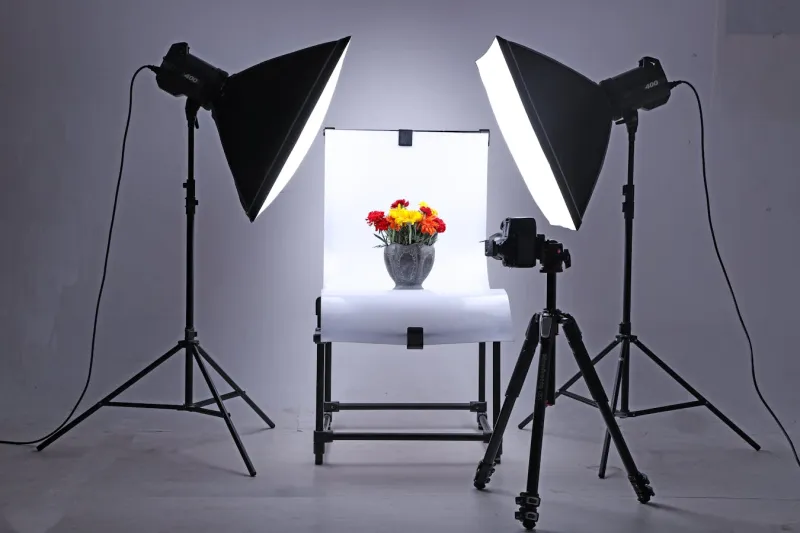
A pure white background is the price of admission for selling on Amazon, eBay, Walmart, and most other marketplaces — RGB(255,255,255), not "almost white," not "slightly cream." But you don't need a studio to produce it. With under $200 in equipment and a repeatable workflow, a single seller can shoot 30-50 SKUs in a day on white that passes every platform's auto-checker. This guide walks the actual SOP, from gear list through shot, with the failure modes called out at each step.
What You're Actually Trying to Achieve
Before any equipment talk, the technical target: a JPG (or PNG) where every background pixel reads as RGB(255,255,255), the product is in sharp focus across its full silhouette, color is true to the physical item, and there is no visible drop shadow on the background (a soft contact shadow under the product is fine and often preferred).
If your final image hits all four, your equipment was sufficient. If it doesn't, no amount of gear upgrade fixes it — the workflow is the bottleneck.
Equipment by Budget Tier
You can do this at three price points. Pick the tier that matches your SKU volume and growth stage, not the one that looks most professional in photos.
| Tier | Budget | Camera | Lighting | Background | When to use |
|---|---|---|---|---|---|
| Starter | <$50 | Smartphone (iPhone 12+ or equivalent) | Window light + white foam board reflector | White poster board or seamless paper | <20 SKUs, testing products, very early stage |
| Standard | $150-250 | Smartphone or entry mirrorless | Two LED panels (5500K, dimmable) + reflector | 53"-wide seamless paper roll | 20-200 SKUs, growing store |
| Pro DIY | $500+ | Mirrorless with 50mm lens | Two LED panels + one background light + softbox | Light tent or dedicated cyc wall | 200+ SKUs, multiple categories, frequent re-shoots |
Three things people overspend on early: the camera body (a current-gen smartphone is enough through Standard tier), expensive softboxes (a $25 white shower curtain works as a diffuser), and tripod heads (any $20 tabletop tripod works for product).
Three things people underspend on: lighting bulbs and continuous-source quality (cheap LEDs flicker and have green color casts that ruin whites), the background width (53"+ seamless avoids visible seams), and a decent editing app (a free mobile photo editor, or a paid one for about $10/month).
The Two-Light Setup That Handles 90% of Products
Three-light setups are textbook. Two lights work for almost everything you'll actually shoot. Here's the geometry:
| Light | Position | Purpose |
|---|---|---|
| Key light | 45° to product, slightly above, 2-3 ft away | Defines product shape and detail |
| Fill light | Opposite side, same height, dimmed 50% of key | Softens shadows from key |
| Reflector (in lieu of 3rd light) | White foam board behind/beside product | Bounces light onto background to push it to pure white |
If your background still reads gray after this, add a third light aimed only at the background — but try the reflector trick first.
The Step-by-Step SOP
Run this every shoot. The order matters because each step depends on the previous one being locked.
Step 1 — Stage the Background
Sweep the seamless paper or poster board into a curve so the floor seamlessly rises into the back wall (the "infinity" curve). No visible seam, no fold line. Tape the back edge to the wall and the front edge to the table. Wipe down for dust — every fingerprint on white shows up at editing time.
Failure mode: A visible seam line behind the product. Fix it now, because removing seams in post takes longer than re-staging.
Step 2 — Set the Lights, Then Lock Them
Position the key light first, then the fill, then meter the background by eye. The background should look brighter than the product itself in the viewfinder — if it looks the same brightness as the product, your lights are wrong. Tape the light stand legs to the floor with gaffer tape so they don't drift between shots.
Failure mode: Inconsistent brightness across SKUs because the lights moved between shots. The taped-down rule sounds excessive until you compare 50 shots and see the exposure drifting.
Step 3 — Lock Camera Settings
Set manual exposure, manual white balance (5500K or use a gray card), and manual focus. Do not use auto-anything for batch shooting — auto exposure shifts every product slightly, and you'll spend more time in editing than you saved in shooting.
| Setting | Recommended value | Why |
|---|---|---|
| White balance | 5500K (daylight) | Matches LED panel color temperature |
| ISO | Lowest available (100 on most cameras) | No noise in shadow areas |
| Aperture | f/8-f/11 | Front-to-back sharpness on small products |
| Shutter | 1/60 - 1/125 | Fast enough to avoid blur from light flicker |
| Format | RAW + JPG | RAW for color recovery, JPG for instant preview |
For smartphones, lock exposure by tap-and-hold on the product, then drag the brightness slider down until the product looks correctly exposed. The background will look overexposed — that's the goal.
Failure mode: Shooting in JPG only on a smartphone, then losing color accuracy in editing because there's no recoverable data. iPhone Pro models support Apple ProRAW; use it.
Step 4 — Place the Product
Center the product on the seamless. Use a small piece of museum putty or fishing line to keep round/unstable products from rolling. For products with reflective surfaces (jewelry, electronics, glass), check the surface from the camera position — if you see your reflection or a reflection of the lights, reposition the product, not the camera.
Failure mode: Visible reflections of the lights or your phone in the product. Solutions: rotate the product slightly, raise the lights higher, or use a polarizing filter.
Step 5 — Shoot the Sequence
For each SKU, shoot a standard sequence in the same order every time:
- Hero shot — front of product, dead center, 85% frame fill
- Three-quarter angle — 30-45° rotation, same height
- Side profile — 90° rotation
- Back — 180° rotation (skip if the back is identical to front)
- Top-down — birds-eye view (only for products where the top matters)
- Detail crops — 1-3 macro shots of stitching, finish, branding, or moving parts
- In-box flat lay — all components laid out, if applicable
A standard 7-shot sequence per SKU at 30-50 seconds each (including repositioning) means 50 SKUs takes about 4-5 hours of pure shooting time, plus 1-2 hours of editing.
Failure mode: Inconsistent angles between SKUs because you eyeballed each one. Mark the camera tripod position with tape on the floor and don't move it between SKUs.
Step 6 — Post-Processing the Background to Pure White
Even with perfect lights, the SOOC (straight-out-of-camera) background usually reads RGB(245-250, 245-250, 245-250) — close to white but not pure. Three common ways to push it to (255, 255, 255):
| Method | Tool | When to use | Time per image |
|---|---|---|---|
| Levels adjustment | Any photo editor with a levels tool | Background is already very bright, just needs the highest 5% pushed | 10 sec |
| Background removal + replace | An AI background remover | Background isn't white enough to recover, OR product has translucent edges | 30-60 sec |
| Manual masking | A photo editor with a masking tool | Hair, fur, fine fabrics, chains — anything with complex edges | 2-5 min |
For batch work, set up an editing preset with the levels adjustment baked in and apply it to all images at once. Hand-correct only the ones that need it.
Failure mode: Pushing levels too far and clipping edges of the product, leaving a halo or chewed silhouette. Always zoom to 200% and check the product edge before exporting.
Step 7 — Verify Against Platform Specs
Before uploading, verify each image against the destination platform:
| Platform | Min dimensions | Background | File format | File size cap |
|---|---|---|---|---|
| Amazon | 1000px (1600px+ for zoom) | Pure white RGB(255,255,255) | JPG, PNG, GIF, TIFF | 10 MB |
| eBay | 500px (1600px recommended) | White or solid color | JPG, PNG | 12 MB |
| Walmart | 1000px (2200px+ recommended) | Pure white | JPG, PNG | 10 MB |
| Shopify | 2048px square recommended | No requirement (white preferred) | JPG, PNG, GIF, WebP | 20 MB |
| Etsy | 2000px short edge | No specific requirement | JPG, PNG, GIF | 10 MB |
The strictest spec is Amazon's. If you shoot for Amazon-grade output, you can use the same images everywhere else.
Common Failure Modes and Their Fixes
These come up on roughly half of first-time DIY shoots:
"My white looks gray"
The lights aren't strong enough relative to the product, or they're not aimed at the background. Either add a reflector behind the product, increase background lighting, or fix it in post with a levels pull on the background only (use a luminosity mask so you don't blow out the product highlights).
"There's a yellow or green color cast"
The light bulbs aren't true 5500K. Cheap LEDs often have low CRI (color rendering index) and produce a green cast. Either replace with proper photography LEDs (CRI 95+), or correct in post by setting white balance against a gray card included in one shot per session.
"The shadow under my product is too harsh"
The fill light is too far from the product, or there's no fill at all. Move the fill closer or add a white foam board reflector on the shadow side. A small contact shadow directly beneath the product is fine — Amazon and other platforms allow it. A long, dark shadow stretching across the background is not.
"The product looks soft / out of focus"
Either the aperture is too wide (f/2.8 doesn't have enough depth of field for products), the shutter is too slow (handshake blur), or the focus point is off. Use f/8-f/11, mount on a tripod, and tap to focus on the product's nearest face.
"Colors don't match the real product"
White balance is off, or you're shooting JPG and the camera's auto-correction is destroying color accuracy. Shoot RAW, set manual WB, and include a gray card or white card reference in your first shot of each session.
FAQ
Do I need a real camera, or is a smartphone enough?
A current-generation flagship smartphone (iPhone 13+ or comparable Android) is enough for the Starter and Standard tiers. The bottleneck for product photography on smartphones is depth of field and macro performance, not resolution. If your products are larger than a baseball or you don't need extreme macro, the phone is fine. For jewelry, watches, or anything below 5cm, a dedicated camera with a real macro lens starts to win.
Can I just remove the background in software instead of shooting on white?
Yes — and for many sellers it's faster than building a lighting setup. Free and paid AI background removers handle most products. The catch: products with translucent parts (mesh, lace, glass), fur, fine hair, or thin wires (cables, chains, jewelry findings) often come out wrong with auto removal. For those, shoot on white and edit. For solid-edge products, AI removal is faster.
What's the right lighting color temperature?
5500K (daylight) is standard. Match the temperature of all lights in your setup — mixing a 3000K (warm) bulb with a 5500K (cool) panel produces uneven color across the product. If you can only afford one light, buy 5500K.
How do I know if my white is "pure white"?
Open the image in any editor, use the eyedropper or color picker on a background pixel, and check the RGB values. They should read (255, 255, 255). Anything in the (245-254) range is "near white" and most platforms accept it, but Amazon's auto-checker can flag it on heavy-traffic listings. For safety, edit to true 255.
Can I reuse the same setup for video?
Mostly yes, with one change: video lights need to be continuous, flicker-free, and at higher CRI than still photography. Cheap LEDs flicker at line frequency (60Hz) and produce visible banding in video. Look for "flicker-free" or "PWM-free" in the LED panel spec sheet. Color temperature and positioning stay the same.
Sources & References
- Product Photography: Craft a Perfect Setup — Shopify
- Product Photography Lighting Setup Guide 2026 — GVM
- How to Light a White Background — Replica Surfaces
- A Guide to Creating White Backgrounds — Visual Education
- Product Photography Lighting Setup — Alan Ranger
- Amazon Seller Central — Product image guide (official)
Save This as Your Standard Operating Procedure
The reason batch-shooting works is that it's boring. Every step is the same. Every product gets the same lighting, the same camera settings, the same angle sequence, the same edit preset. The first SKU takes 20 minutes; SKU number 30 takes 90 seconds. Print this SOP, tape it to the wall by your shooting table, and refuse to deviate from it for the first 50 products you shoot. The consistency you get is worth more than any equipment upgrade.